Which photos work for a Hotel Lobby AI video?
Upload two separate JPEG, PNG or WebP photos, one consenting adult per photo. Each must be at most 10 MB, with both width and height between 300 and 6,000 pixels. Clear faces and visible upper bodies supply useful detail; convert HEIC to JPEG or PNG first.
- Input
- 2 adult portraits · JPG / PNG / WebP · ≤10 MB each · 300–6000 px per side
- Output
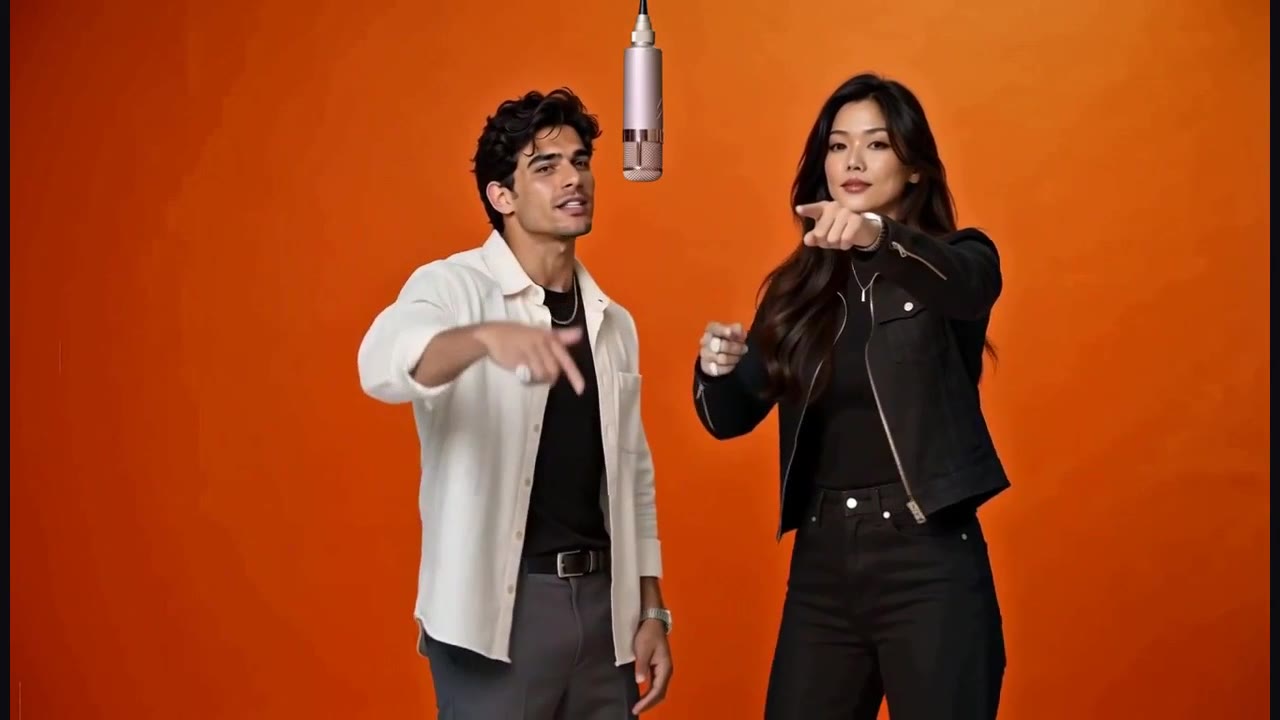
- 10-second MP4 with audio · 16:9 · optional fitted 9:16
- One-time price
- Configured $9.90 / 720p · new generation paused
One person per photo
Keep the face unobstructed and use a separate photo for each adult performer. Avoid group photos, sunglasses, masks, heavy motion blur and extreme side angles. For the Hotel Lobby template, a waist-up photo supplies more outfit information than a tightly cropped face. Keep the source outfit you want to appear in the result; whole-person replacement includes clothing.
Lighting and detail matter more than file size
Use soft, even light so both eyes and the jawline are visible. A large file can still contain a blurred face; inspect it at its original size. Avoid aggressive beauty filters that erase facial detail. Export the original photo rather than a screenshot of a compressed social post. The example portraits on this page illustrate clear faces and visible upper bodies; they are fictional people, not a guarantee of your result.
Use a usable file
Upload JPEG, PNG or WebP, up to 10 MB per photo, with both dimensions between 300 and 6,000 pixels. The server checks the actual format and dimensions. If your phone stores HEIC, export a JPEG or PNG first. Renaming a .heic extension to .jpg does not convert the file. A single image containing two faces still does not become two independent references.
Preview the left and right assignments
Choose the person for the left performer first, then the right performer. If the roles are reversed in the thumbnails, use Swap roles before submitting. Remove an accidental file and choose the intended portrait again. Check that you have two different source photos and the required permission before confirming a paid task; the finished output cannot be edited by swapping the original inputs afterward.
What better photos cannot guarantee
Clear portraits improve the information available to the model, but cannot guarantee identity stability, perfect hands or exact lip sync across every frame. Higher resolution is a larger output specification, not a promise that every identity issue disappears. Watch the real example, understand that AI details can vary, and choose the price and quality you are comfortable trying.
Respect likeness rights
Only upload your own portrait or an adult who gave permission to appear in the video. Do not fabricate endorsements, sexual content or deceptive impersonation. Your input portraits are private and expire after seven days. Completed videos are retained for thirty days; you choose whether to publish a share link and can delete your files from your account.
Actual example inputs and result
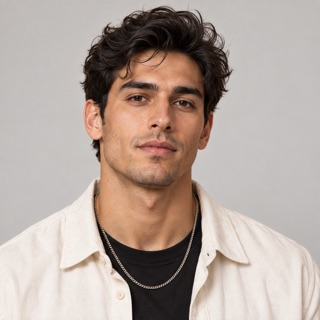
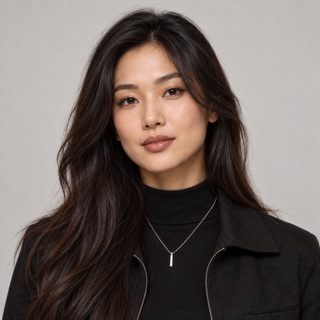
Two fictional adult portraits used for the public sample. These are demonstration inputs, not customer photos.
Watch the corresponding 10-second result with soundRelated questions
Which photos can I upload?
Upload two separate JPEG, PNG or WebP photos, one consenting adult per photo. Each must be at most 10 MB, with both width and height between 300 and 6,000 pixels. Clear faces and visible upper bodies supply useful detail; convert HEIC to JPEG or PNG first.
Read the full answerCan I use a friend's photo?
Yes, if that adult agreed to appear in this video. Do not upload anyone under 18 or someone who has not given permission. Sexual content, non-consensual intimate imagery and deceptive impersonation are prohibited.
Read the full answerWho sees my photos, and how long are files kept?
Files are private to your account and the suppliers required to process the request. On this site, inputs become inaccessible after 7 days and completed outputs after 30 days, then scheduled cleanup deletes them. Active-task inputs remain until processing ends; suppliers follow their own retention policies. Public sharing is optional. You can delete completed video files in My videos; contact support to request earlier deletion of uploaded portraits.
Read the full answerShould I choose 720p or 1080p?
Seedance 2.0 Fast supports up to 720p. New video generation is awaiting validation and 1080p generation is paused. Existing 1080p videos can still be downloaded within their retention period. Public comparisons are historical Recast tests, not evidence of the new model's quality.
Read the full answerProduct details and policies
This guide describes the current AI Hotel Lobby workbench. Specifications and pack counts come from its template and price configuration; they are not a benchmark success rate.